

Available
Android TV and TV boxes
- Version
- 1.0.5
- Needs
- Android 5.0 or newer
- File
- APK, 96 MB
Fire TV · DownloaderOpen the Downloader app and type this code
5980124Scan a QR code with your phone and your TV signs in on its own. Nothing to type with the remote, and your password stays on your phone.
Typing a password with a TV remote is slow. With X GO you do it on your phone, where you already have a keyboard.
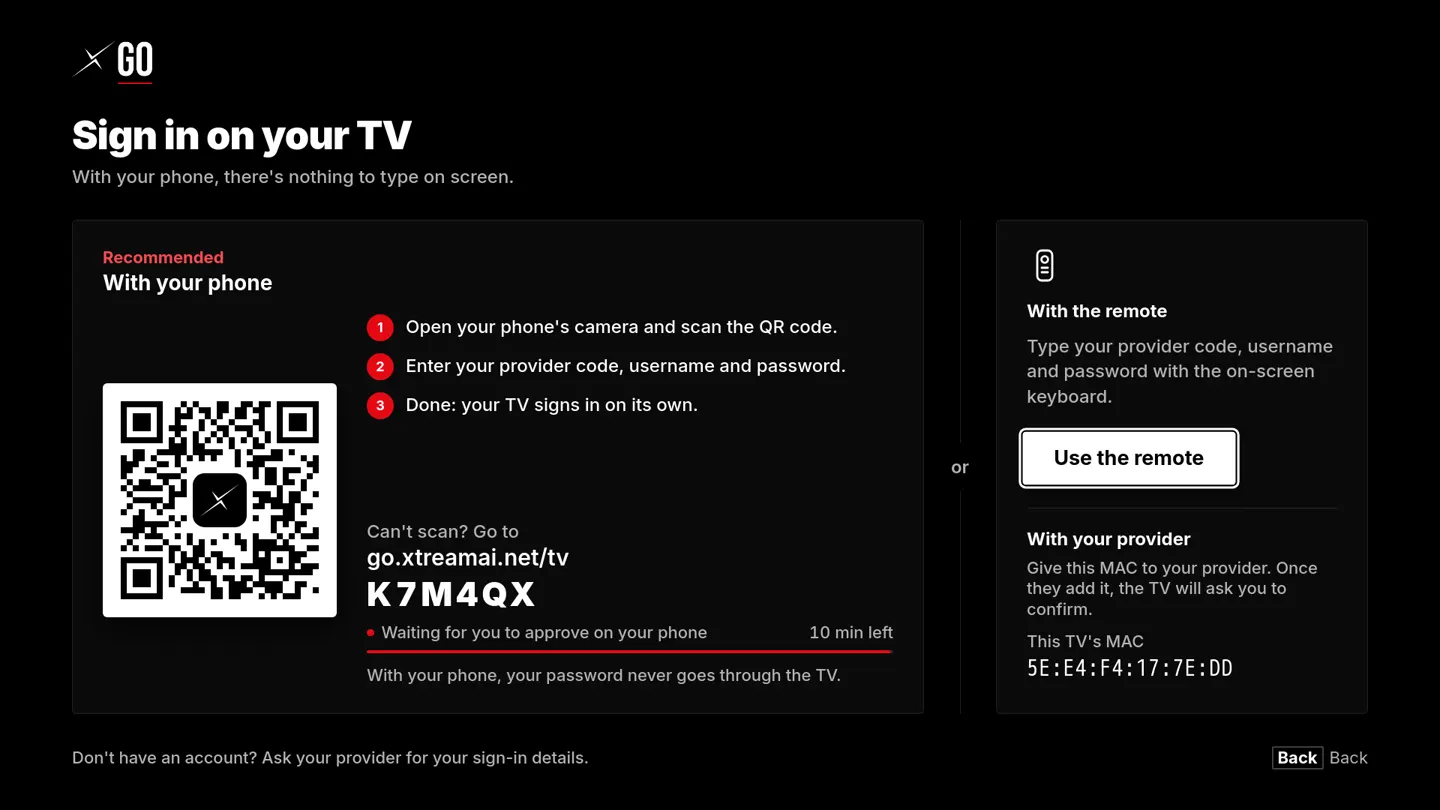
The sign-in screen, as it appears on your TV.
Open your phone's camera and point it at the TV.
Your provider code, username and password, the ones your provider gave you.
No buttons to press on the TV. Your password never goes through it.
Six letters and numbers. This one is only an example: yours comes from your provider.
X GO has its own on-screen keyboard, built for the arrow keys. Enter your provider code, username and password in four short steps.
Try it here: click the keyboard and use your arrow keys and Enter, or press the buttons on the remote.
Same app, same look on every device. X GO checks for updates by itself, so you only install it once.
X GO for LG TVs is on the way. Follow our Telegram channel to hear the day it's out.
X GO is installed directly from our website for now, so your device may ask you to confirm. These are the steps.
Already installed? X GO tells you when a new version is ready.
Your clients watch your channels, movies and series on their Smart TV. X GO signs in with the lines you already sell, and everything about it lives in your Streaming Engine panel, under Clients → App TV.
Each reseller and sub-reseller gets their own provider code. Their clients use that code, not yours.
Share a QR or a link, or send it by WhatsApp straight from the panel. Your client only needs the code, their username and their password.
Open a line to see the TVs that use it and which one is watching now. Disconnect one and it stops working on that TV within a minute.
When a line expires, the TV connects again by itself as soon as you renew it. The same happens when you unblock a line.
They only need this code, along with their username and password.
Your client scans it with their phone, or opens this link.
TVs that used this line in the X GO app.
The App TV page shows up in your panel once your server is on version 3.0.0 or later.
Your main server needs the little padlock next to its web address. We help you set it up.
Want X GO for your clients? Open a ticket and we'll turn it on for your panel.
No. X GO is a player. You watch the channels, movies and series of your provider by signing in with the details they give you. If you don't have an account, ask your provider.
We're starting with direct downloads so you can use X GO today. Store versions come next, and we'll announce each one on our Telegram channel.
The main Download APK button works on every Android TV box. The 64-bit and 32-bit files are smaller; use them if you know which one your box needs.
Yes. When you link with your phone, you type your password on the phone and it never goes through the TV. The code on screen only works for a few minutes.
Six: English, Spanish, Portuguese, French, Italian and Turkish.